
Most online stores are losing organic traffic to problems they don’t know exist.
A proper ecommerce SEO audit uncovers the crawl issues, indexation errors, and on-page gaps that quietly drain search visibility and revenue. It’s not the same as a standard SEO audit. Product catalogs create duplicate URLs, crawl budget waste, and canonical conflicts at a scale most sites never deal with.
This guide covers every audit layer, from technical crawl health and site architecture to structured data, Core Web Vitals, and backlink profile analysis.
By the end, you’ll have a clear framework for finding what’s broken, prioritizing fixes by revenue impact, and turning audit findings into an action plan your team can actually execute.
What Is an Ecommerce SEO Audit?
An ecommerce SEO audit is a structured review of the technical, on-page, and content factors that affect an online store’s organic search performance. It covers crawlability, indexation, site architecture, product page signals, internal linking, and page experience.
The key difference from a standard SEO audit: ecommerce sites generate thousands of URLs through product variations, filter pages, and pagination. These create crawl budget waste, canonical conflicts, and duplicate content at a scale most content sites never face.
The output is a prioritized list of issues ranked by impact on organic revenue, not just a flat list of technical errors.
Why Ecommerce Sites Need a Separate Audit Framework
The numbers explain it plainly. Organic search drives 43% of all ecommerce traffic, more than paid search, social, and email combined (Charle, 2026).
Yet 96.55% of all indexed pages receive zero organic traffic from Google (Ahrefs). That gap exists largely because of structural problems that only appear at the product-catalog scale.
- 53% of ecommerce websites have pages with missing canonical tags (Reboot Online, 2025)
- 62.4% have at least one broken link affecting crawl paths (Reboot Online, 2025)
- 86% of ecommerce brands lack properly optimized internal links (Reboot Online, 2025)
A general SEO audit framework won’t surface these issues in the right context. Ecommerce audits require platform-specific logic for Shopify, WooCommerce, and Magento, because each generates different structural problems by default.
What the Audit Covers
Six core audit layers, in order of diagnostic priority:
| Audit layer | Primary focus | Key tool |
|---|---|---|
| Technical crawl health | Redirect chains, broken links, crawl traps | Screaming Frog Sitebulb |
| Site architecture | URL structure, click depth, category hierarchy | Screaming Frog Log file analysis |
| Indexation control | Canonical conflicts, noindex errors, thin content | Google Search Console |
| On-page signals | Product and category page optimization | Screaming Frog Semrush |
| Internal linking | PageRank distribution, orphaned pages | Sitebulb Screaming Frog |
| Page experience | Core Web Vitals, mobile usability | PageSpeed Insights CrUX |
A proper ecommerce SEO strategy depends on knowing which of these layers is causing the most damage before deciding where to allocate resources.
What Does an Ecommerce SEO Audit Cover?
The audit scope goes beyond what a standard crawl report shows. Product catalogs create URL sets that conflict with each other at scale, and the audit needs to account for that architecture, not just individual page errors.
Each platform creates its own structural problems. Shopify appends ?variant= parameters to product URLs. WooCommerce generates tag archive pages that index by default. Magento creates layered navigation URLs that can reach billions of combinations without proper controls in place.
Platform-Specific Scope Differences
Shopify: Duplicate product URLs from /collections/ and /products/ paths. Canonical tag implementation needs verification on every product page.
WooCommerce: Product tag archives, shop page pagination, and attribute filter URLs all require indexation decisions before any audit findings make sense.
Magento: Layered navigation can produce exponential URL combinations. A site with 10 filterable attributes, each with 10 options, can theoretically generate over 10 billion unique URLs (ClickRank, 2026). This is not a hypothetical edge case.
How Audit Scope Scales with Catalog Size
Under 1,000 SKUs: Full crawl analysis, complete indexation review, manual review of top-revenue product pages.
1,000 to 50,000 SKUs: Log file analysis becomes necessary to understand actual Googlebot behavior vs. what the crawl reports show.
Over 50,000 SKUs: Crawl segmentation by page type (homepage, category, product, filter, pagination) is the only practical approach. Reviewing how large-scale online stores handle SEO reveals that most prioritize crawl efficiency fixes before any content work.
How Do You Audit the Technical Crawl Health of an Ecommerce Site?

Crawl the site with Screaming Frog SEO Spider or Sitebulb. Set crawl depth to at least 10 levels to match the actual depth of large product catalogs. Cross-reference the crawl output with Google Search Console’s Crawl Stats report to see which pages Googlebot is actually visiting vs. which ones the crawler finds.
The average ecommerce site scores 67/100 on Google Lighthouse (Taylor Scher SEO). That failing grade usually traces back to crawl-layer problems that compound into page experience issues.
Common Crawl Findings on Ecommerce Sites
These 4 issues appear in almost every ecommerce crawl audit:
- Redirect chains on product URLs: Especially common after platform migrations or URL restructuring. Each hop wastes crawl budget and dilutes PageRank.
- Orphaned pages: Product pages with zero internal links. Googlebot won’t find them unless they appear in the XML sitemap.
- 4xx errors on discontinued products: These pages should 301 redirect to the closest relevant category, not return a 404 and die silently.
- Infinite crawl space from filter combinations: A site with 10 filterable attributes at 10 options each can generate over 10 billion URL combinations (ClickRank, 2026).
How to Handle Discontinued Product Pages
3 options exist. Which one applies depends on whether the product has a successor or a relevant category to absorb the traffic.
| Scenario | Recommended action | Why |
|---|---|---|
| Product replaced by newer version | 301 redirect New product page | Consolidates link equity to the live successor |
| Product discontinued, category exists | 301 redirect Closest category page | Keeps traffic within the site |
| Product permanently gone, no close match | Return 410 (Gone) | Signals intentional removal to Googlebot faster than 404 |
Google’s confirmed preference: 301 to the closest relevant page, not the homepage. A homepage redirect from a specific product page is essentially a crawl dead-end for that page’s link equity.
Faceted Navigation and Crawl Budget
This is where most mid-to-large ecommerce sites lose the most crawl budget. Faceted navigation creates 3 compounding SEO problems: duplicate content, crawl budget waste, and diluted link equity (Search Engine Journal).
Google’s 2024 update on faceted navigation confirmed uncontrolled filter pages remain one of the biggest sources of crawl inefficiency across the web (JetOctopus, 2025).
Fix sequence: use robots.txt to block low-value filter combinations (size, color, sort order), implement canonical tags on any filter pages that stay crawlable, and verify in Google Search Console’s “Crawled – currently not indexed” report how many filter URLs Googlebot is discovering but rejecting.
How Do You Audit Ecommerce Site Architecture?
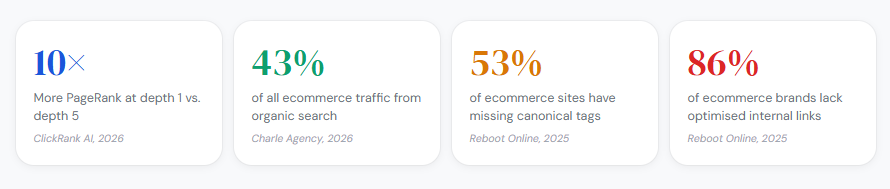
Site architecture determines how PageRank flows across the catalog. Every click away from the homepage dilutes the authority that reaches the destination page. A page at depth 1 may receive up to 10x more PageRank than the same page positioned at depth 5 (ClickRank AI, 2026).
The goal: every product reachable within 3 clicks from the homepage. Amazon keeps most products within 3 clicks specifically because of this PageRank decay math.
Click Depth Analysis
Pull click depth data from Screaming Frog: Reports > Crawl Depth. Look for products sitting at depth 5 or beyond.
Pages beyond depth 5 receive minimal crawl frequency. Log file analysis consistently shows a decay curve in bot visit frequency as click depth increases (Devender Gupta, 2026).
- Depth 1-3: Crawled frequently, strong PageRank flow
- Depth 4-5: Moderate crawl frequency, reduced authority
- Depth 6+: Irregular crawls, weak authority, high risk of being missed entirely
Category Structure Cannibalization Check
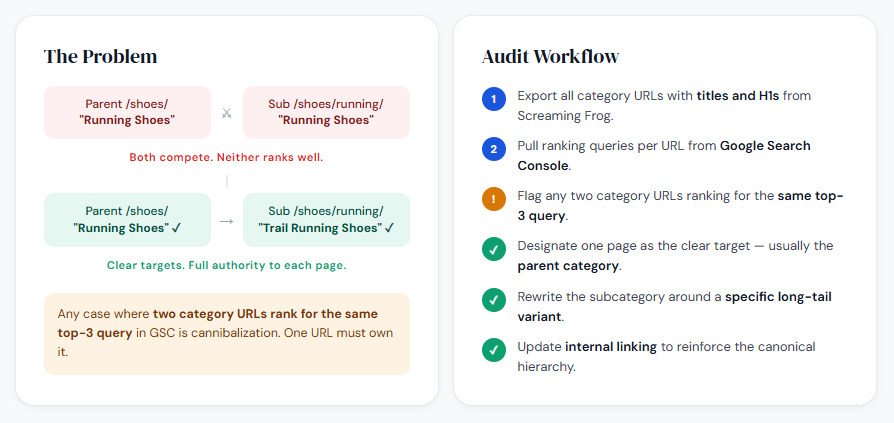
Categories cannibalizing each other’s keyword targets is a silent revenue killer. It happens when subcategory pages target the same primary term as their parent category.
Run a keyword mapping check across category URLs: export all category page titles and H1s from Screaming Frog, then cross-reference against ranking data in Google Search Console. Any case where 2 category URLs rank for the same top-3 query is cannibalization.
Resolve it by making one page the clear target (usually the parent) and adjusting the subcategory’s content angle to a more specific long-tail variant.
Breadcrumb and Siloing Errors
Breadcrumb structured data must match the visible breadcrumb and the URL hierarchy exactly. Mismatches between BreadcrumbList schema and the visible path create conflicting signals for Googlebot.
Siloing error to check: products appearing under multiple category paths without canonical consolidation. This creates duplicate product URL versions that split link equity between identical pages. Verify the canonical on each product points to one definitive URL, regardless of which category path was used to reach it.
How Do You Audit Indexation on an Ecommerce Site?

Pull the Index Coverage report from Google Search Console. Filter by “Excluded” and work through 4 subcategories: Noindex, Duplicate without user-selected canonical, Crawled but not indexed, and Alternate page with proper canonical.
Each subcategory reveals a different type of indexation problem. Treating them as one combined “excluded” bucket is one of the most common audit mistakes.
Reading the Excluded Report by Subcategory
Crawled but not indexed: Google found the page, didn’t think it was worth indexing. Usually means thin content, near-duplicate content, or a low-quality signal from the page’s content and links.
Duplicate without user-selected canonical: Multiple URLs with similar content, and no canonical pointing Google to the preferred version. Fix by adding a self-referencing canonical to the preferred URL and pointing all variants to it.
Noindex: Intentional or accidental. Confirm every URL in this list was deliberately excluded. Accidentally noindexed category pages are more common than most teams realize, especially after platform updates on Shopify or WooCommerce.
Thin Content Detection on Product Pages
Product pages with fewer than 200 words of unique body content are frequent indexation failures. But word count alone doesn’t define thinness.
Thin content on ecommerce means: manufacturer description copied across multiple stores, no unique product attributes covered, no FAQ or user review content, and no contextual internal links. Retailers that optimize product descriptions see a 32% increase in organic sales (BigCommerce internal data, cited by SearchAtlas).
Priority queue for rewrites: highest-revenue products first, then highest-traffic, then products with the most external backlinks pointing to them.
Canonical Conflicts Across Product Variants
Canonical conflicts are the indexation problem most specific to ecommerce. They appear in 3 forms:
- Missing self-referencing canonical: The page has no canonical tag at all, leaving Google to guess the preferred version.
- Canonical pointing to a redirected URL: The canonical target itself returns a 301, creating a conflicted signal.
- Canonical pointing to a noindexed page: Google cannot index either version. Both disappear from search.
Cross-reference Screaming Frog’s canonical data against the Index Coverage report to find all 3 variants in one pass.
How Do You Audit Product Page Optimization?

Product pages are where ecommerce technical SEO work converts into revenue. The audit here has two layers: technical correctness (crawlable, indexable, canonicalized) and on-page signal quality (title, description, content, schema).
The average ecommerce page title is just 39 characters, well under the 50-60 character best practice. The average meta description is 96 characters, again below the 150-160 character standard (Reboot Online, 2025). These aren’t minor issues. Short titles often mean missing transactional keywords that could be captured without any additional content work.
Title Tags and Meta Descriptions
Title tag structure that works: Primary keyword + product name + differentiator (brand, size, material). Keep it under 60 characters to avoid truncation in SERPs.
Meta descriptions don’t directly affect rankings, but they affect click-through rate, which affects traffic volume. Include price, one key differentiator, and a direct call to action. Generic meta descriptions (“Buy [product] at [store name]”) waste the character budget.
Duplicate Product Descriptions
Manufacturer descriptions copied across multiple stores create site-wide duplicate content issues. This affects a significant share of ecommerce sites, particularly in electronics, home goods, and fashion verticals where manufacturer copy is the default.
Ahrefs found that product pages with 300+ words of unique content ranked 32% higher on average than those with minimal or duplicate descriptions (2024 analysis).
Minimum viable uniqueness: an original intro paragraph covering use cases, a unique specs section with buyer-context framing, and an FAQ block addressing real purchase questions. That combination makes a product page sufficiently distinct even if the core specifications are shared across the web.
Product Schema Markup Verification
Required fields for Product schema to qualify for rich results:
- name: Must match the visible product title exactly
- offers: Price, currency, and availability (InStock / OutOfStock)
- aggregateRating: Only include if reviews exist; fake or thin review counts trigger manual review flags
- image: High-resolution, minimum 1200px on the longest side for Google’s image requirements
Validate in Google’s Rich Results Test. Pages with correct schema markup achieve 20-40% higher click-through rates than equivalent pages without it (Charle, 2026). Validate after every platform update, because Shopify and WooCommerce theme changes frequently overwrite schema implementations.
Image Optimization Audit
File names: Descriptive, hyphenated, keyword-relevant. DSC00291.jpg contributes nothing. mens-waterproof-hiking-boots-merrell.webp does.
Alt text should describe the product with its key attributes, not stuff keywords. Convert to WebP format across all product images. A one-second delay in page load reduces conversions by 7% (Taylor Scher SEO). Product image file size is consistently one of the biggest contributors to that delay.
How Do You Audit Category Page Optimization?

Category pages drive the majority of ecommerce organic traffic. They rank for broader, higher-volume queries than product pages, and they function as the primary PageRank distribution hubs for the product catalog below them.
Most ecommerce stores underinvest in category page content. A category page with only a product grid and a pagination link has almost no unique text for Google to evaluate. That makes it structurally identical to every filtered variant of the same page.
Content Requirements for Category Pages
A category page needs 3 distinct content components to compete for broad transactional queries:
- Above-the-fold H1 and description: 100-200 words covering the category’s primary keyword, key product attributes, and the buyer’s primary decision criteria. This content loads with the page, not after JavaScript.
- Internal navigation links: Links to subcategories and related categories pass PageRank deeper into the catalog and signal topical depth to Googlebot.
- Below-the-fold editorial content: Buying guide content, comparison notes, or FAQ blocks. This content serves long-tail query coverage without cluttering the shopping experience.
Pagination Handling Audit
Paginated category pages (/page/2, /page/3) create an indexation decision. There are 2 acceptable approaches.
Option 1: Canonical all paginated pages to page 1. This concentrates link equity on the main category URL but removes paginated pages from the index.
Option 2: Allow paginated pages to index with unique content signals (load-more product sets, unique intro copy per page). This only works if each paginated page offers genuinely distinct product listings with enough unique content to justify a separate indexation.
Most stores should use Option 1. Paginated category pages rarely rank independently, and the canonical approach keeps the main category URL stronger. Check that category page SEO implementation is consistent across all paginated variants, not just the first page.
Keyword Cannibalization Between Categories and Subcategories
This is the most common structural error on mid-size ecommerce sites. A “Running Shoes” category and a “Men’s Running Shoes” subcategory both targeting the query “running shoes” will split Google’s ranking signal between them.
Fix: Assign “running shoes” as the target for the parent category. Shift the subcategory to “men’s running shoes” as its primary keyword, with content and title tag adjusted to match. Do this mapping before any content changes, or the content work goes to the wrong page.
How Do You Audit Internal Linking for an Ecommerce Site?

Internal linking is the most underused lever in ecommerce SEO. 86% of ecommerce brands lack properly optimized internal links, and even among the highest-visibility stores, 41% still have significant internal linking gaps (Reboot Online, 2025).
The audit goal here is straightforward: confirm that PageRank flows from high-authority pages toward the product and category pages that generate revenue.
Finding Orphaned and Near-Orphaned Pages
Export “All Inlinks” from Screaming Frog under Bulk Export. Filter for pages with 0 or 1 internal links pointing to them.
These are your orphaned and near-orphaned pages. Googlebot may find them via the XML sitemap, but they receive almost no PageRank and get crawled irregularly. A product page with zero internal links is effectively invisible to Google’s ranking systems, regardless of how good the content is.
Verifying PageRank Distribution Across the Catalog
Run a PageRank distribution crawl in Sitebulb.
The result shows which pages absorb the most internal link equity. Cross-reference against Google Search Console’s top-revenue pages. If high-revenue category pages rank below depth 3 in internal link equity distribution, you have a structural mismatch.
- Homepage and nav links: highest PageRank source
- Category hub pages: second tier, should link down into subcategories and products
- Related products sections: distribute equity laterally across the catalog
- Blog and buying guides: link to relevant category pages, not just the homepage
Anchor Text Audit
Over-optimized exact-match anchor text on internal links is a pattern Google has flagged in manual reviews. Vary anchor text across all instances of a link to the same destination page.
Pull the anchor text distribution from Screaming Frog’s “Anchor” export. Any destination URL receiving more than 60% of its internal links with identical anchor text is an over-optimization risk, especially on category pages targeting competitive transactional queries.
Cross-linking between related categories passes contextual PageRank and helps Google map the topical structure of the catalog. A “Running Shoes” category page should link to “Running Socks” and “Running Gear” categories, not just receive links from its parent navigation.
How Do You Audit Core Web Vitals for an Ecommerce Site?

Only 48% of mobile pages and 56% of desktop pages pass all three Core Web Vitals as of 2025 (Web Almanac). For ecommerce specifically, this matters because a one-second delay in page load reduces conversions by 7% (Taylor Scher SEO).
Pull CWV data from Google Search Console’s Core Web Vitals report. Segment by page type: homepage, category, product, and checkout. Each page type has different failure patterns.
LCP Failures on Category Pages
LCP is the hardest Core Web Vital to pass. Only 62% of mobile pages achieve a good LCP score (Web Almanac, 2025).
On ecommerce sites, LCP failures on category pages almost always trace to one of 2 sources: large hero images loading without fetchpriority="high", or unoptimized product carousels where the first image isn’t preloaded.
Swappie, a refurbished phone retailer, achieved a 55% improvement in LCP through mobile CWV optimization, which contributed to a 42% increase in mobile revenue (Search Engine Land, 2024). That’s not a marginal gain from a secondary ranking factor.
CLS and INP: The Two Ecommerce-Specific Failures
CLS on product pages: Product images lazy-loaded without reserved dimensions shift the layout as they load. Cookie banners injected above the fold without reserved space cause CLS scores above 0.1. Both are fixable by setting explicit width and height attributes on all images.
INP on add-to-cart buttons: INP replaced FID in March 2024 and measures every interaction, not just the first one. Add-to-cart buttons with heavy JavaScript event handlers are the primary INP failure point on ecommerce product pages. Break long JavaScript tasks into smaller chunks using async/await and yield to the main thread.
Tool Stack for CWV Audit
| Tool | Data type | Best for |
|---|---|---|
| Google Search Console | Field data (CrUX) | Site-wide segmentation by page type |
| PageSpeed Insights | Lab data Field data | Individual URL diagnosis |
| WebPageTest | Waterfall analysis | Identifying render-blocking resources |
| CrUX Dashboard | Historical field data | Tracking score changes over time |
Always use field data from CrUX for real decisions. Lab scores from Lighthouse reflect a controlled environment, not actual user hardware and network conditions.
How Do You Audit Structured Data on an Ecommerce Site?
Structured data reduces ambiguity for Googlebot and powers rich results in SERPs. Product schema with price, availability, and review data can increase click-through rates by 30% or more (Hashmeta, 2025).
The audit covers 3 things: which schema types are implemented, whether they validate without errors, and whether the schema data matches the visible page content.
Required Schema Types by Page
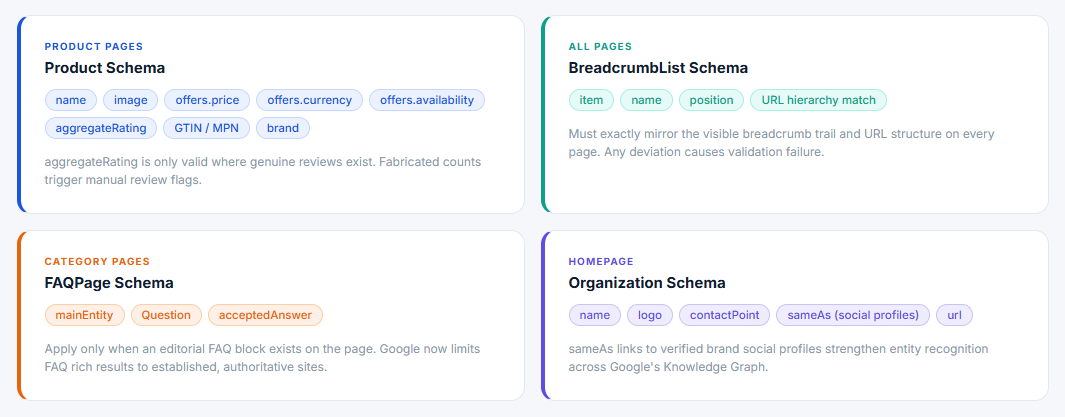
Not all schema types apply everywhere. Misplacing schema creates errors that prevent rich results for the entire site.
- Product pages: Product schema with name, image, offers (price, currency, availability), and aggregateRating where genuine reviews exist
- All pages: BreadcrumbList matching the visible breadcrumb and URL hierarchy exactly
- Category pages: FAQPage schema on the editorial FAQ block, if one exists (Google now shows FAQ rich results only for established, authoritative sites)
- Homepage: Organization schema with verified contact, logo, and sameAs links to brand social profiles
Common Schema Errors That Block Rich Results
A 2025 study of 177 ecommerce websites found that only 57% implemented schema using JSON-LD, which is Google’s preferred format (Digital Chakra, 2025). The rest used Microdata or RDFa, both of which create higher maintenance overhead and validation complexity.
Price mismatch: Schema price differs from the visible price on the page. This is a hard error that removes all product rich results, not just a warning.
Availability field missing: Product schema without offers.availability is ineligible for Google’s Shopping Graph integration, which affects visibility in the Shopping tab and AI-powered product results.
AggregateRating with insufficient data: Review aggregates require real reviews. Fake counts or counts below Google’s threshold trigger manual review flags.
Merchant Center and On-Page Schema Alignment
Mismatches between on-page Product schema and the Google Merchant Center feed cause product listing disapprovals. These disapprovals reduce Shopping tab visibility even when the organic product page ranks normally.
Check for mismatches on price, availability, and product identifiers (GTIN, MPN, brand) by cross-referencing the Merchant Center diagnostics tab against the schema output from Google’s Rich Results Test. Any field that conflicts between the two data sources needs resolution before the next feed crawl. Learning how schema markup works across ecommerce page types gives context on which conflicts cause the most damage to organic visibility.
How Do You Audit the Backlink Profile for an Ecommerce Site?
The backlink audit has one job: confirm that the link profile supports ranking goals and identify the highest-priority acquisition targets. Routine disavow work is overrated as an audit priority. Most ecommerce sites don’t have a manual penalty, and Google’s SpamBrain already discounts most low-quality links algorithmically.
67% of domains evaluated by Ahrefs over the past 10 years have at least one toxic backlink (Vazoola, 2026). That doesn’t mean 67% of sites need a disavow file. It means most sites have some weak links that Google is already ignoring.
What to Actually Look For in the Backlink Audit
Pull the full referring domain list from Ahrefs Site Explorer or Semrush Backlink Analytics. The 3 things that matter:
Domain authority trend: Is the Ahrefs Domain Rating (DR) growing, flat, or declining over the past 12 months? A declining trend without active link-building changes signals either link loss or algorithmic devaluation of existing links.
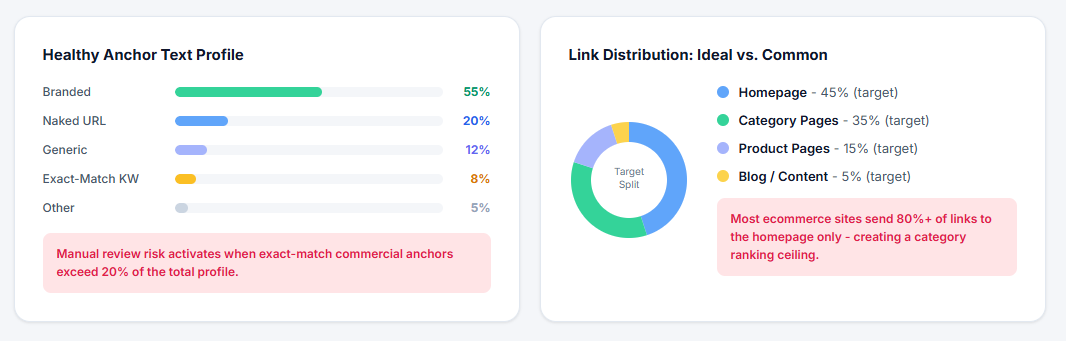
Homepage vs. category link distribution: Most ecommerce sites over-concentrate links on the homepage. Category pages need direct backlinks to rank for broad transactional queries. If 80%+ of referring domains link only to the homepage, category rankings will hit a ceiling.
Anchor text concentration: An anchor text profile where exact-match commercial keywords exceed 20% of all anchor text is a risk threshold for manual review. Branded anchors should dominate. Naked URL anchors are healthy. Exact-match keyword anchors should be a small minority.
Competitor Backlink Gap Analysis
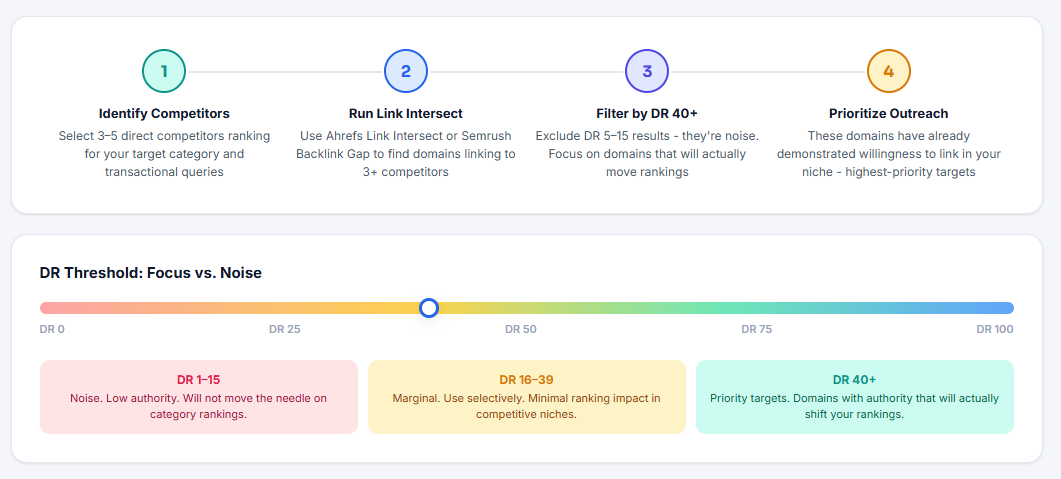
Backlink gap analysis is where the actual opportunity lives, not disavow cleanup. Use Ahrefs’ Link Intersect or Semrush’s Backlink Gap tool to find domains linking to 3 or more competitors but not to the audited site.
These domains have already demonstrated willingness to link to sites in the niche. They are the highest-priority targets for any ecommerce link building outreach.
Filter the gap results by DR 40+ to focus outreach on domains that will actually move the needle. A long list of DR 5-15 opportunities is noise.
How Do You Prioritize and Report Ecommerce SEO Audit Findings?
The audit is only useful if it produces decisions. A report that lists 200 issues with equal urgency gets ignored.
Prioritization is by revenue impact, not technical severity alone (The Marketing Agency, 2026). A canonical tag error on the top-revenue category page is more urgent than 50 meta description length warnings on low-traffic blog posts.
Prioritization Framework
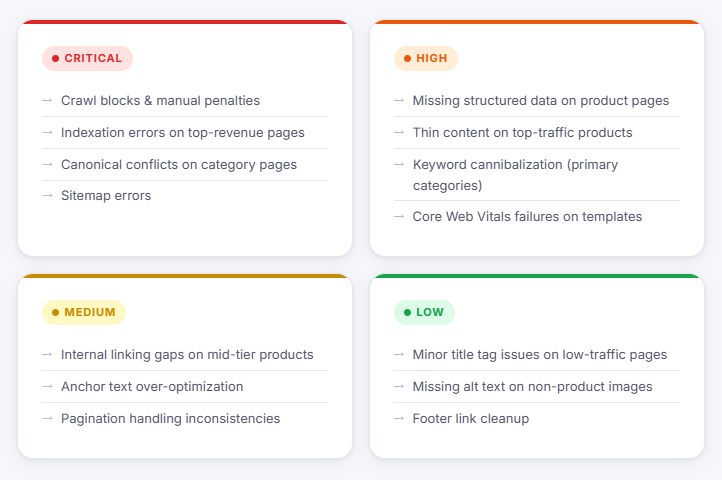
Group all findings into 4 tiers before writing the report:
- Critical: Crawl blocks, manual penalties, indexation errors on top-revenue pages, canonical conflicts on category pages, sitemap errors
- High: Missing structured data on product pages, thin content on top-traffic products, keyword cannibalization between primary categories, Core Web Vitals failures on category and product templates
- Medium: Internal linking gaps on mid-tier products, anchor text over-optimization, pagination handling inconsistencies
- Low: Minor title tag length issues on low-traffic pages, missing alt text on non-product images, footer link cleanup
Estimating Traffic Impact Before Reporting
Assign an estimated organic traffic impact to each Critical and High tier finding before finalizing the report. Pull the affected pages from Google Search Console’s Performance report. Look at current clicks and impressions for those pages.
A canonical error on a category page generating 3,000 monthly impressions at 2% CTR represents 60 lost clicks per month at minimum. That number makes the fix concrete for non-SEO stakeholders.
Vizup’s 2026 ecommerce audit guide makes the point directly: a broken internal link on a page with 12 monthly visits is less urgent than a canonical error on the top-selling category page, regardless of what a technical severity score says.
Report Format
Two-section structure works best:
Executive summary (one page): 3-5 findings with revenue or traffic context, written for a decision-maker who won’t read the appendix. Lead with the Critical tier findings only.
Technical appendix: full issue list with affected URLs, fix instructions, and ownership assignments (SEO team vs. developer vs. content team). Include a 30-60-90 day implementation roadmap. A report without a roadmap is an observation list, not an action plan.
Audit Cadence
Full audit: every 6 months, or immediately after a platform migration, major URL restructure, or Google core update that caused a measurable traffic drop.
Ongoing checks run on a shorter cycle. Crawl health and indexation reviews work best monthly. Core Web Vitals monitoring in Google Search Console should be weekly for any site above 50,000 URLs, where a template-level CWV regression can affect thousands of pages simultaneously. For ongoing ecommerce SEO strategy execution, the audit cadence should be baked into the quarterly planning cycle, not treated as a reactive one-off.
FAQ on Ecommerce SEO Audit
What is an ecommerce SEO audit?
An ecommerce SEO audit is a structured review of an online store’s technical health, site architecture, indexation, on-page signals, and backlink profile. It identifies issues blocking organic visibility and ranks fixes by revenue impact.
How often should you run an ecommerce SEO audit?
Run a full audit every 6 months. After a platform migration or Google core update that caused a traffic drop, run one immediately. Monthly crawl health and indexation checks cover the gaps between full audits.
What tools do you need for an ecommerce SEO audit?
The core stack: Screaming Frog SEO Spider for crawl analysis, Google Search Console for indexation and Core Web Vitals data, Ahrefs or Semrush for backlink profile review, and PageSpeed Insights for page experience diagnosis.
What is crawl budget and why does it matter for ecommerce?
Crawl budget is the number of pages Googlebot crawls per session. Ecommerce sites waste it on faceted navigation URLs, redirect chains, and thin filter pages. This delays indexation of new products and category pages that actually need to rank.
How do you fix duplicate content on product pages?
Replace manufacturer descriptions with original content covering use cases, unique specs, and buyer FAQs. Implement canonical tags on variant URLs pointing to the primary product page. Prioritize rewrites by revenue and traffic, not alphabetically.
What does an ecommerce SEO audit check on category pages?
Category pages get checked for keyword cannibalization with subcategories, missing or thin editorial content, pagination canonical handling, internal link equity flow into subcategories, and BreadcrumbList schema matching the visible breadcrumb path.
How do Core Web Vitals affect ecommerce SEO?
Only 48% of mobile pages pass all three Core Web Vitals (Web Almanac, 2025). For ecommerce, LCP failures on category pages and INP issues on add-to-cart buttons are the most common. Both directly affect rankings and conversion rates.
What schema markup does an ecommerce site need?
Product schema with name, image, price, currency, and availability on every product page. BreadcrumbList across all page types. AggregateRating only where genuine reviews exist. Validate everything with Google’s Rich Results Test after every platform update.
How do you prioritize ecommerce SEO audit findings?
Prioritize by revenue impact, not technical severity. A canonical error on a top-category page outranks 50 meta description warnings on low-traffic blog posts. Group findings into Critical, High, Medium, and Low tiers before writing the report.
What is a backlink gap analysis in an ecommerce audit?
Backlink gap analysis finds domains linking to 3 or more competitors but not to your store. These domains have already shown willingness to link within your niche. They are the highest-priority targets for ecommerce link building outreach.
Conclusion
This conclusion is for an article presenting the full scope of what a structured ecommerce SEO audit actually covers, from crawl budget management and canonical tag implementation to Core Web Vitals, product schema validation, and backlink gap analysis.
The audit is not a one-time fix. It’s a repeatable process that keeps indexation clean, PageRank flowing to revenue pages, and organic search performance compounding over time.
Start with the Critical tier findings. Fix crawl blocks and indexation errors before touching content or on-page SEO.
Everything else follows a priority order tied to traffic and revenue, not technical scores. Run the process every six months, check crawl health monthly, and treat each audit cycle as an input into your broader ecommerce SEO strategy.
