
Most online stores are invisible to Google before a single product description is written.
Ecommerce technical SEO is the infrastructure layer that determines whether Googlebot can find, crawl, and index your product and category pages at all.
62.4% of ecommerce sites have broken links. 53% are missing canonical tags. 86% lack optimized internal linking (Reboot Online, 2025). These aren’t content problems. They’re structural ones.
This guide covers the 12 technical areas that directly affect ecommerce crawlability, indexation, and rankings, from site architecture and crawl budget allocation to structured data, Core Web Vitals, and log file analysis.
What Is Ecommerce Technical SEO?
Ecommerce technical SEO is the process of configuring a store’s infrastructure so search engines can crawl, index, and rank product and category pages efficiently. It covers everything from URL structure and crawl budget allocation to structured data markup and JavaScript rendering.
This is different from general technical SEO. The scale is the problem. A standard CMS site might have a few hundred pages. An ecommerce site can have tens of thousands of product URLs, dynamic filter combinations, session-based parameters, and variant pages, all of which create indexation and duplication challenges that don’t exist elsewhere.
53% of ecommerce sites have missing canonical tags, affecting an average of 40.38% of pages on impacted sites (Charle Agency, 2025). That’s not a content problem. That’s a technical infrastructure problem.
The 4 core systems that ecommerce technical SEO addresses directly:
- Crawl budget allocation across product, category, and faceted navigation pages
- URL structure and parameter handling to prevent duplicate indexation
- Structured data markup (Product, BreadcrumbList, AggregateRating schema)
- Page speed and Core Web Vitals scores at scale
A full ecommerce SEO audit will surface all of these issues in one pass, showing exactly which page types are draining crawl budget and where indexation is failing.
Without a working technical foundation, content investments don’t compound. Googlebot can’t rank pages it hasn’t indexed.
How Does Site Architecture Affect Ecommerce Crawling and Indexing?
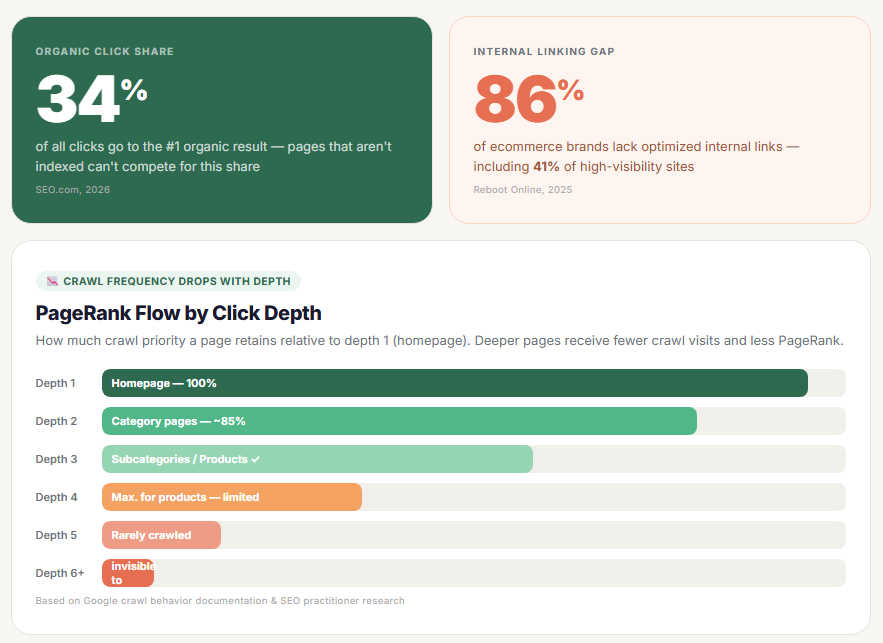
Site architecture determines which pages Googlebot finds, how often it revisits them, and how much PageRank flows through the catalog. On ecommerce sites, poor architecture is the fastest way to bury product pages.
The position-one organic result captures 34% of all clicks (SEO.com, 2026). Pages that aren’t indexed can’t compete for that space, regardless of how good the content is.
Flat vs. Deep Architecture: Which Works Better for Large Catalogs?
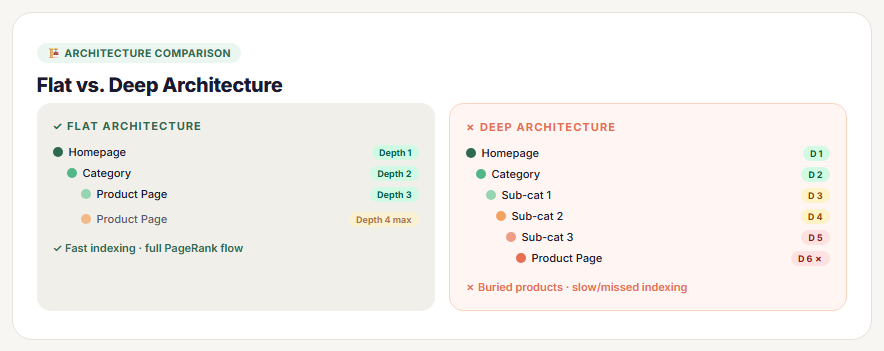
Flat architecture keeps every indexable page within 3 clicks of the homepage. Pages at crawl depth 4 or beyond receive significantly less crawl frequency and lower PageRank distribution.
Deep architecture creates hierarchy problems at scale. A 50,000-SKU store with 6 levels of subcategory nesting will have product pages Googlebot rarely visits. That means new inventory takes weeks to appear in search results.
Practical rule: Category pages at click depth 2, subcategories at depth 3, product pages at depth 3 or 4 maximum. Anything deeper needs internal links from higher-authority pages to compensate.
Amazon manages this with aggressive internal cross-linking. “Customers also bought” modules create thousands of internal link paths, keeping product pages within reach of Googlebot regardless of catalog depth.
How Internal Linking Distributes Crawl Budget Across Product Pages
86% of ecommerce brands lack optimized internal links, including 41% of high-visibility sites (Reboot Online, 2025). Internal linking isn’t optional. It’s how PageRank reaches product pages.
| Internal link source | Pages it supports | Crawl impact |
|---|---|---|
| Homepage | Top-level categories | High Daily crawl |
| Category pages | Subcategories + featured products | Medium-high |
| Product pages | Related products, upsells | Medium |
| Blog / content pages | Category pages, specific products | Medium Context-rich |
Siloed architecture groups products by category and passes contextual signals through internal links. This helps search engines associate product pages with the right semantic domain, not just crawl them.
Contextually relevant product links (“shop the collection featured in this guide”) outperform generic “related products” carousels. The anchor text carries the semantic signal. Generic anchors like “Product #4821” carry none.
What Is Crawl Budget and Why Does It Matter for Ecommerce Sites?

Crawl budget is the combination of how many pages Google is willing to crawl on a site (crawl rate limit) and how urgently it perceives those pages need to be crawled (crawl demand). Google defined this framework in its 2017 crawl budget documentation, and the principles haven’t changed.
For small sites, crawl budget is irrelevant. For ecommerce sites with 10,000+ URLs, it determines which products actually get indexed.
When Crawl Budget Becomes a Real Problem
A mid-sized outdoor gear retailer with 50,000 product pages had only 8,000 indexed. Googlebot was making 200,000 crawl requests per day but spending most of that activity on parameter-generated URLs. Actual product pages were being visited roughly once every 3 weeks.
That’s the crawl budget problem in practical terms. It’s not that Google won’t crawl. It’s that crawl activity gets diverted to low-value URLs while commercial pages sit undiscovered.
3 primary crawl budget wasters on ecommerce sites:
- Faceted navigation generating thousands of parameter URL variants
- Session IDs appended to product URLs (?sessionid=abc123)
- Internal search results pages indexed and crawled repeatedly
Tools for Diagnosing Crawl Budget Issues
Google Search Console Coverage report shows the ratio of indexed vs. submitted URLs. A large gap between submitted and indexed pages on a well-structured XML sitemap usually points to crawl budget waste.
Log file analysis goes deeper. Tools like Screaming Frog Log File Analyser and Sitebulb parse server logs to show exactly which URLs Googlebot is requesting and how frequently. This reveals the actual crawl pattern, not just what Google reports in Search Console.
Robots.txt directives and noindex tags are the 2 control mechanisms. Robots.txt prevents crawling entirely. Noindex allows crawling but stops indexation. For parameter URLs with zero search value, robots.txt is the correct choice. Googlebot still has to crawl a page to read a noindex tag.
How Does Faceted Navigation Create Duplicate Content and Indexation Problems?
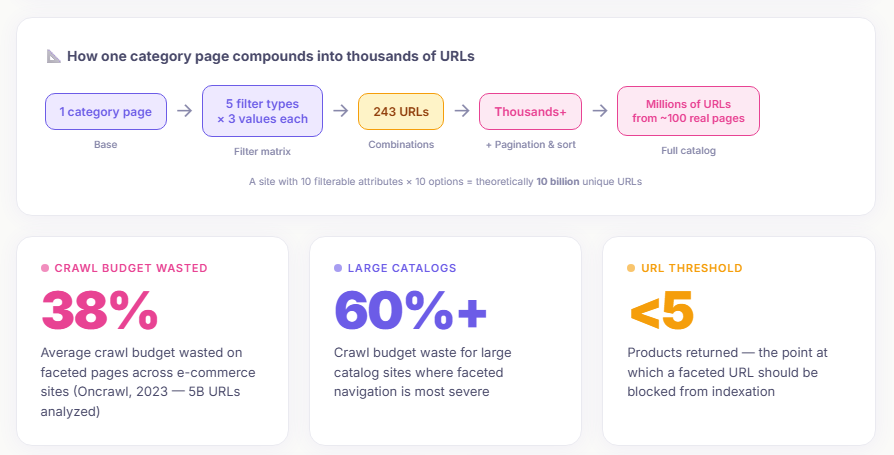
Faceted navigation is the single largest technical SEO problem specific to ecommerce. No other site type generates duplicate URL proliferation at this scale.
A single category page with 5 filter types and 3 values each creates 243 possible URL combinations. Add pagination and sort options, and that number reaches into the thousands per category. Across a full catalog, this can produce millions of crawlable URLs from a few hundred real pages.
When to Index vs. Block Faceted Navigation URLs
Not all faceted URLs are worthless. The decision comes down to search demand and page uniqueness.
Index when: A filter combination has measurable search volume (e.g., “red running shoes size 10”), the page has genuine content differentiation, and the product selection is large enough to justify a landing page.
Block when: The filter is sort-only (price ascending, newest first), the combination returns fewer than 5 products, or the page is a near-duplicate of the parent category.
Shopify, Magento, and WooCommerce all handle faceted navigation differently. Shopify’s default generates canonical tags pointing to parent collections, which is a reasonable baseline. Magento requires explicit configuration. WooCommerce depends heavily on the plugin being used for filtering.
Canonical Tags vs. Robots.txt: Which Control Method to Use
| Scenario | Recommended control | Why |
|---|---|---|
| Sort / order parameters (?sort=price) | Robots.txt disallow | Zero search value, saves crawl budget |
| Low-volume color / size filters | Noindex Canonical to parent | Crawled but not indexed, equity flows up |
| Filter combos with real search demand | Index Self-referencing canonical | Legitimate landing page |
| Pagination (/page/2, /page/3) | Self-canonical per page | Each page is genuinely unique |
Canonical tags act as a strong hint to Google, not a directive. Google can override them if it determines a different URL better represents the content. Consistent implementation across all filter patterns reduces the chance of Google ignoring them.
How Do Duplicate Product Pages Affect Ecommerce Rankings?
Product-level duplication is quieter than faceted navigation problems. It doesn’t generate millions of URLs. But it dilutes PageRank across product variants and creates indexation ambiguity that hurts rankings for individual SKUs.
29% of ecommerce pages have duplicate or near-duplicate content issues (SEMrush ecommerce study). The problem is rarely intentional. It’s structural.
The 4 Main Sources of Ecommerce Duplicate Content
Manufacturer descriptions: Using supplier-provided copy across product pages creates content identical to dozens of other retailers. Google doesn’t penalize this, but it’s a signal of thin, non-original content.
Color and size variant URLs: /shoes/red-sneakers/ and /shoes/blue-sneakers/ often share 95% of their content. Without canonical tags pointing variants to the primary product URL, PageRank gets split across all variants.
Session ID parameters: URLs like /product-name/?sessionid=xyz generate a unique URL per visitor. Some ecommerce platforms do this by default without canonicalization. Screaming Frog will surface these during a crawl audit.
HTTP vs. HTTPS conflicts: If both versions of the site return 200 status codes without a redirect or canonical, Google treats them as separate domains. This is a basic infrastructure issue that should not exist in 2025, yet it still appears in technical audits regularly.
Hreflang for Multi-Region Ecommerce
When the same product page targets the same language in different countries (e.g., UK English and US English), hreflang signals tell Google which version to serve to each region. Without it, Google selects a version based on its own signals, which may not match your intended target market.
Hreflang implementation on ecommerce sites with large catalogs is tricky. Each product URL needs a corresponding hreflang annotation. XML sitemap-based hreflang is the most scalable method for catalogs over 10,000 pages.
What Structured Data Types Are Required for Ecommerce?
Structured data on ecommerce sites does 2 things: it helps Google understand page content faster (reducing cost of retrieval), and it qualifies pages for rich results that increase click-through rates directly.
Pages with schema markup achieve 20-40% higher click-through rates, and rich results deliver 82% higher CTR compared to standard blue-link results (Charle Agency, 2025). For an online store, that’s the difference between a listing that attracts attention and one that gets skipped.
Product Schema: Required vs. Recommended Properties

Google’s required properties for Product schema to qualify for rich results:
- name (product title)
- image (at least 1 product image URL)
- description (product description text)
- offers including price, priceCurrency, and availability
The most common implementation error is a static availability value. If your schema says InStock but the product is actually out of stock, Google may demote the rich result or flag it as misleading. Availability should pull dynamically from inventory data, not be hardcoded in the template.
Recommended properties that improve visibility: AggregateRating (triggers star ratings in SERPs), brand, sku, and shippingDetails. Shopify’s Dawn theme includes Product schema by default. Magento requires configuration. WooCommerce needs a dedicated plugin or custom implementation.
BreadcrumbList and AggregateRating Schema
BreadcrumbList schema reinforces the site hierarchy signals that internal linking creates. It tells Google the canonical path to a product: Home > Category > Subcategory > Product. In mobile SERPs, breadcrumbs replace the raw URL in the result listing.
AggregateRating schema surfaces star ratings below the page title in search results. The visibility increase is measurable. Rakuten 24 saw conversion rate improvements after Core Web Vitals and structured data optimization work, with the structured data component directly contributing to higher SERP CTR.
How to Validate Structured Data with Google’s Rich Results Test
Google’s Rich Results Test accepts a URL or HTML code and shows exactly which schema types are detected, which properties are present, and which errors exist.
Common errors found during validation:
- Missing
priceCurrencyfield (price without currency is invalid) - AggregateRating with fewer than 1 review (Google requires at least 1 rating)
- Multiple conflicting Product schemas on a single page
Google Search Console’s Rich Results report shows which pages have valid, warning, or error states across the live site. This is the monitoring layer after initial validation. For a broader look at how schema markup for ecommerce works across different page types and platforms, the implementation details vary significantly by catalog structure.
How Do Core Web Vitals Impact Ecommerce Conversion and Rankings?
Google confirmed Core Web Vitals as a ranking signal in June 2021. Three years later, most ecommerce sites still fail the test. 70.5% of ecommerce sites fail to meet Lighthouse performance standards, with an average Lighthouse score of just 67/100 (Reboot Online, 2025).
The revenue impact is direct. Ecommerce sites loading in 1 second have 3x higher conversion rates than slower sites. A 1-second delay in load time reduces conversions by 7% (Portent, 2024).
LCP Optimization for Product and Category Pages

Largest Contentful Paint measures when the biggest visible element loads. On product pages, that’s almost always the hero product image. On category pages, it’s typically the first product image in the grid.
Target: LCP under 2.5 seconds. Only 62% of mobile pages globally achieve this (2025 Web Almanac). That means 38% of ecommerce product pages are failing the most visible performance metric.
The 3 highest-impact LCP fixes for ecommerce:
- Add
fetchpriority="high"to the LCP image element (browser loads it before HTML parsing completes) - Serve images in WebP or AVIF format with appropriate compression
- Use a CDN to reduce time to first byte on product image requests
Swappie, a refurbished phone retailer, achieved a 55% LCP improvement and a 91% CLS improvement, which led to a 42% increase in mobile revenue (Search Engine Land, 2024). That’s a technical fix producing commercial results.
INP Issues Caused by Cart and Checkout Interactions
Interaction to Next Paint replaced First Input Delay in March 2024. INP measures responsiveness across every interaction during a session, not just the first click. This matters for ecommerce because add-to-cart buttons, quantity selectors, and filter toggles all generate interactions that INP tracks.
Target: INP under 200ms. Globally, 77% of mobile pages achieve this (2025 Web Almanac), making it the Core Web Vital with the highest pass rate. Still, the 23% that fail are often ecommerce sites with heavy JavaScript-driven cart functionality.
redBus reduced interaction latency by categorizing delays, reducing JavaScript blocking, and debouncing scroll handlers. The result was a 7% increase in sales from smoother page interactions alone.
The INP fix for most ecommerce stores comes down to one decision: offload heavy cart and checkout JavaScript execution from the main thread using Web Workers, or defer non-critical scripts that block interaction response times.
CLS Problems from Dynamic Price and Inventory Elements
Target: CLS under 0.1. Layout shift on ecommerce pages typically comes from 3 sources: late-loading product images without declared dimensions, cookie consent banners that push content down on load, and dynamically injected price or “in stock” badges that shift surrounding elements.
Yahoo! JAPAN fixed a CLS issue and saw a 15.1% increase in page views per session and a 13.3% longer session duration. For ecommerce, longer sessions with more page views mean more product discovery, which feeds conversion.
The fix is structural. Declare explicit width and height on all product images. Reserve space for dynamic elements before they load using CSS aspect-ratio or min-height. Place cookie banners in a fixed position that doesn’t affect document flow.
How Does JavaScript Rendering Affect Product Page Indexation?
Googlebot uses a two-wave process to handle JavaScript. The first wave crawls and indexes the raw HTML. The second wave executes JavaScript and processes dynamic content. That second wave can take hours or weeks, depending on site authority and crawl demand (Discovered Labs, 2026).
For ecommerce sites, this delay has a direct business consequence. Product prices, inventory availability, and customer reviews loaded via client-side JavaScript may not be indexed at first crawl. Pages with critical commercial data rendered only in the browser sit in “Discovered, currently not indexed” status in Google Search Console.
98.7% of websites now have some level of JavaScript reliance (Sitebulb, 2024). For ecommerce, that number is closer to 100%. The question isn’t whether you use JavaScript. It’s whether your rendering strategy is costing you indexation.
Client-Side Rendering vs. Server-Side Rendering for Ecommerce
| Rendering method | Googlebot sees on first crawl | Indexation speed |
|---|---|---|
| Client-Side (CSR) | Empty HTML shell | Days to weeks Second wave |
| Server-Side (SSR) | Full rendered HTML | Hours First wave |
| Static Site Generation (SSG) | Pre-built complete HTML | Fastest No rendering queue |
| Dynamic Rendering | Pre-rendered HTML for bots only | Fast Served directly to crawler |
Next.js, Nuxt, and SvelteKit all support SSR out of the box. For a React-based storefront using client-side API calls to load product data, migrating to Next.js with generateStaticParams for top products and getServerSideProps for the long-tail catalog resolves the indexation delay entirely.
How to Verify JavaScript Indexation with Google Search Console
URL Inspection tool shows the rendered HTML screenshot Google sees after executing JavaScript. If the screenshot shows a loading spinner instead of product content, your product name, price, and availability are not indexed.
Run URL Inspection on 10 representative product URLs across different categories. Look for 3 specific things:
- Product name visible in rendered HTML (not just page title)
- Price and availability showing as text, not as placeholder elements
- Structured data detected (Product schema should appear in the “Enhancements” section)
AI crawlers including GPTBot, ClaudeBot, and PerplexityBot do not execute JavaScript at all (Discovered Labs, 2026). If visibility in AI-generated search results matters for your store, SSR or SSG becomes a business requirement, not just a technical preference.
What Is the Correct URL Structure for Ecommerce Sites?
URLs that include words related to a target keyword earn a 45% higher click-through rate than those without keyword-relevant terms (Backlinko, 2025). URL structure is one of the fastest, lowest-effort signals you can optimize on a product or category page.
Clean, hierarchical URLs also reduce crawl ambiguity. Googlebot infers topical relevance from URL structure before it reads a single word of page content.
Category-Based URL Hierarchy for Product Pages
The correct format for an ecommerce URL follows this pattern: /category/subcategory/product-name/
This structure passes 3 signals simultaneously to search engines: the product’s category context, its subcategory relationship, and the specific product name. Googlebot can associate the product page with the correct semantic domain before rendering the page.
Wrong: /prod?id=98876451&sid=variant_03
Right: /mens-footwear/running-shoes/product-name/
Keep full URLs under 60 characters where possible. Research from Stan Venture (2025) found that CTR dropped 15% when URLs exceeded 60 characters. That’s a ranking-independent traffic loss caused purely by URL length.
Product Variant URL Handling
The choice between separate URLs per variant vs. a single URL with JavaScript-based variant switching affects both crawl budget and indexation depth.
Separate variant URLs work best when:
- Each variant has unique search demand (e.g., “red Nike Air Max 90” vs. “blue Nike Air Max 90”)
- Variant pages have genuinely distinct content beyond color/size differences
Single URL with JavaScript switching works best when: variants differ only in attribute (color, size) with no separate search volume, and you want to consolidate PageRank to one product URL.
Shopify uses a single URL with ?variant=ID parameters by default. These parameter URLs should carry self-referencing canonical tags pointing to the main product URL. Without that, Google treats each variant as a separate page and splits ranking signals across all of them.
URL Consistency After Site Migrations
Redirect chains are the most common URL issue after platform migrations. Each hop in a redirect chain degrades the PageRank passed to the destination.
Correct: Old URL → 301 → New URL (1 hop)
Wrong: Old URL → 301 → Interim URL → 301 → New URL (chain)
Log file analysis after a migration confirms whether Googlebot is following the new redirect structure or still crawling deprecated URLs. Sites that botch HTTPS migrations without clean redirects can see organic traffic drops of 15-30%, with recovery taking 3-6 months (Octaria, 2025). A pre-launch ecommerce SEO strategy that maps every URL with a redirect plan prevents this entirely.
How Should Ecommerce XML Sitemaps Be Structured?
15% of websites are missing an XML sitemap entirely, and over 17% have sitemaps containing URLs that return 3XX redirect responses (SE Ranking, 2025). Both are direct crawl budget problems for ecommerce sites with large catalogs.
An XML sitemap isn’t just a list of URLs. It’s a crawl priority signal. Google uses <lastmod> dates to decide which pages to recrawl first. If product pages show stale modification dates, Googlebot deprioritizes them.
Sitemap Index Structure for Large Catalogs
A single sitemap file is capped at 50,000 URLs and 50MB. Catalogs beyond that need a sitemap index file that references multiple child sitemaps.
Split by category, not alphabetically. Category-based sitemap splitting lets you diagnose indexation issues per section in Google Search Console. If your “Footwear” sitemap shows 90% indexation but “Accessories” shows 20%, you know exactly where the problem is.
What to include vs. exclude from XML sitemaps:
- Include: Canonical product URLs, category pages, subcategory pages, image sitemaps for product photography
- Exclude: Noindex pages, paginated filter URLs, parameter variants, out-of-stock pages you intend to remove
Image Sitemaps for Product Photography
Image sitemaps are required for Google Images indexation of product visuals. Without one, product photos may not appear in Google Shopping or image search results.
Required image sitemap properties: <image:loc> (image URL), <image:title> (product name), and optionally <image:caption> for descriptive alt text context.
Shopify generates image sitemaps automatically. Magento requires configuration. WooCommerce relies on Yoast SEO or Rank Math plugins to include image data in sitemap output.
Monitoring Submitted vs. Indexed URLs in Search Console
Submitting a sitemap doesn’t guarantee indexation. The Coverage report in Google Search Console shows the ratio of submitted URLs to indexed pages. A consistent gap between those two numbers indicates a crawl quality or duplicate content problem, not a sitemap formatting issue.
Track this ratio monthly. If submitted URLs rise (new inventory) but indexed pages stay flat or drop, the site has an indexation efficiency problem that no amount of sitemap optimization fixes. The underlying cause is almost always crawl budget waste from faceted navigation or duplicate product content.
How Do Out-of-Stock and Discontinued Product Pages Affect Ecommerce SEO?
Out-of-stock page handling is one of the most mismanaged areas in ecommerce technical SEO. The wrong decision deletes accumulated PageRank and organic traffic. The right decision preserves it while managing user experience.
A full picture of how to approach this correctly starts with running a proper ecommerce SEO audit that segments product pages by stock status, backlink count, and organic traffic before making any removal decisions.
Temporary Out-of-Stock: Keep the Page Live
Temporarily unavailable products should stay live at the same URL with a 200 status code. Remove nothing from the XML sitemap. Keep all internal links intact.
Why it matters: Removing a page from internal links and sitemaps signals lower importance to Googlebot. Crawl frequency drops. When the product restocks, reclaiming the original ranking position takes significantly longer than if the page had stayed live throughout the out-of-stock period.
Update the page content to show the out-of-stock status clearly. Add an expected restock date or a “Notify Me” email capture. Update the Product schema availability property to OutOfStock so structured data stays accurate.
Discontinued Products: 3 Handling Options
High backlink count + organic traffic: Keep the page live, update Product schema itemAvailability to Discontinued, move to a “Discontinued” category internal link rather than deleting from catalog entirely.
Relevant replacement available: 301 redirect to the closest equivalent product. The replacement must be genuinely relevant. Redirecting to a category page when a specific replacement product exists is a weak signal that passes less equity.
No replacement, minimal SEO value: Return a 410 Gone status. A 410 tells Googlebot the page is permanently removed, prompting faster removal from the index compared to a 404. Update the XML sitemap and remove all internal links pointing to the removed URL.
What Log File Analysis Reveals About Ecommerce Crawl Behavior?
Google Search Console shows what Google reports about your site. Log files show what Google actually does on your site. The gap between those two data sources is where hidden crawl problems live.
Log file analysis is especially important during and after site migrations. Log data confirms whether Googlebot is following new redirects or still crawling deprecated URLs from the old architecture (Search Engine Land, 2025).
What Log Data Shows That Search Console Doesn’t
Crawl frequency per URL type: Logs show exactly how often Googlebot visits each URL pattern. If faceted navigation URLs receive 10x more visits than category pages, that’s measurable crawl budget waste invisible in Search Console.
Real-time status code patterns: Repeated 404 requests to the same dead product URLs waste crawl capacity. Log analysis shows which specific URLs Googlebot keeps retrying, often years after a page was removed.
Bot differentiation: Unlike Search Console, logs separate Googlebot Smartphone from Googlebot Desktop, Bingbot, and AI crawlers including GPTBot and ClaudeBot. Each bot’s crawl behavior on your site tells a different story about content accessibility.
Tools for Ecommerce Log File Analysis
Screaming Frog Log File Analyser handles millions of log events and allows cross-referencing with XML sitemap data to identify orphan pages and indexation gaps.
Botify and JetOctopus are built for enterprise ecommerce scale, with dashboards segmented by URL type, status code, and crawl frequency. Both integrate with Google Search Console data for correlated analysis.
For teams comfortable with Python, parsing logs using pandas with matplotlib visualization gives the most flexible analysis layer. This approach works well for correlating crawl frequency changes with specific technical deployments or product catalog updates.
Crawl Monitoring Cadence for Ecommerce Sites
Set monitoring frequency based on site risk, not convenience.
- Daily: During and immediately after site migrations, platform changes, or large catalog updates
- Weekly: Established stores with frequent inventory changes
- Monthly: Stable sites with slow-changing catalogs
Automate alerts for 5xx error spikes, rising 4xx patterns in key category directories, and sudden growth in parameterized URL crawl volume. The most damaging technical SEO regressions on ecommerce sites don’t announce themselves. They accumulate quietly in log data weeks before rankings move. Running a structured ecommerce SEO audit alongside log analysis gives the full picture of both infrastructure health and crawl efficiency in one pass.
For a broader view of how these technical foundations connect to traffic and revenue outcomes, the ecommerce SEO statistics data across the industry makes the business case clearly. Technical issues aren’t abstract. They map directly to indexation rates, organic traffic, and conversion.
FAQ on Ecommerce Technical SEO
What is ecommerce technical SEO?
Ecommerce technical SEO is the process of configuring a store’s infrastructure so search engines can crawl, index, and rank product and category pages. It covers site architecture, crawl budget, URL structure, structured data, page speed, and JavaScript rendering.
Why does crawl budget matter for online stores?
Crawl budget determines how many pages Googlebot visits within a set period. On large catalogs, faceted navigation and parameter URLs waste that budget on low-value pages, leaving actual product pages crawled infrequently or not at all.
How does faceted navigation cause duplicate content?
Filter combinations generate thousands of near-identical URLs from a single category page. A catalog with 10 filter types can produce millions of crawlable variants, diluting crawl budget and splitting PageRank across pages with no distinct search value.
What structured data types does an ecommerce site need?
The core schema types are Product, AggregateRating, BreadcrumbList, and Offer. Product schema requires name, image, description, price, priceCurrency, and availability. Missing or static availability values are the most common implementation error across Shopify, Magento, and WooCommerce sites.
How do Core Web Vitals affect ecommerce rankings?
Google confirmed Core Web Vitals as a ranking signal in 2021. LCP, INP, and CLS directly affect product page visibility. Ecommerce sites loading in one second convert at 3x the rate of slower sites, making performance a commercial issue, not just a technical one.
What causes JavaScript indexation problems on product pages?
Client-side rendering delivers an empty HTML shell to Googlebot on the first crawl. Product prices and availability loaded via JavaScript enter a secondary rendering queue, delaying indexation by days or weeks. Server-side rendering resolves this by delivering complete HTML on the first request.
How should out-of-stock product pages be handled for SEO?
Temporarily unavailable products should stay live at the same URL with a 200 status code. Permanently discontinued products with strong backlink profiles warrant a 301 redirect to the closest equivalent. Pages with no SEO value should return a 410 Gone status.
What is the correct URL structure for ecommerce sites?
Use a category-based hierarchy: /category/subcategory/product-name/. Keep full URLs under 60 characters. Avoid session IDs, dynamic parameters, and non-descriptive SKU strings in indexable URLs. URLs with relevant keywords earn a 45% higher CTR than non-descriptive alternatives (Backlinko, 2025).
What does log file analysis reveal that Search Console doesn’t?
Log files show real Googlebot behavior: exact crawl frequency per URL, repeated 404 requests on dead product pages, and whether bots spend time on filter variants instead of core category pages. Search Console reports estimates. Logs show ground truth.
How should ecommerce XML sitemaps be structured for large catalogs?
Use a sitemap index file that references child sitemaps split by product category. Exclude noindex pages, filtered URLs, and redirect targets. Include accurate <lastmod> dates and a separate image sitemap for product photography to support Google Images and Shopping indexation.
Conclusion
This conclusion is for an article presenting ecommerce technical SEO as the foundation every online store needs before investing in content or link building.
Faceted navigation, JavaScript rendering gaps, missing Product schema, and poor crawl depth are not edge cases. They affect the majority of ecommerce sites right now.
Fix the URL structure and canonical tag implementation first. Then address Core Web Vitals, XML sitemap configuration, and out-of-stock page handling. Each fix compounds.
Log file analysis and the Google Search Console Coverage report tell you where Googlebot is actually spending its time. Use both regularly.
Site crawlability determines whether your product pages rank at all. Get the infrastructure right, and everything else works harder.
