
Most online stores rank for keywords nobody buys from.
That is the core problem with generic keyword research applied to ecommerce. High search volume looks good in a report. It rarely shows up in revenue.
Ecommerce keyword research is a different process entirely. It maps purchase intent to specific page types, from product pages to category pages to filter URLs, so organic traffic actually converts.
Organic search drives 43% of all ecommerce traffic and generates nearly 1 in 4 online orders (Charle Agency, 2026). Getting the keyword strategy right determines how much of that traffic lands on your store.
This guide covers the full process: keyword types, search intent analysis, keyword mapping, cannibalization fixes, prioritization, and performance tracking.
What Is Ecommerce Keyword Research?
Ecommerce keyword research is the process of identifying search queries that signal purchase intent across product pages, category pages, and filter URLs in an online store.
It is not a variation of general keyword research. The goal is different. General keyword research maps informational queries to content. Ecommerce keyword research maps transactional and commercial investigation queries to pages that sell.
Organic search drives 43% of all ecommerce traffic and generates 23.6% of all online orders (Charle Agency, 2026). That traffic does not arrive through guesswork. It comes from matching the right search query to the right page type.
The 3 page types ecommerce keyword research serves:
- Product pages – target specific transactional queries with clear purchase intent
- Category pages – target head terms and commercial investigation queries
- Filter and facet pages – target attribute-level combinations when search volume justifies indexing
Most keyword research tools default to surfacing informational data. That creates a targeting mismatch. A tool showing 22,000 monthly searches for “running shoes” does not tell you that Google returns category pages for that query, not product pages. Reading the SERP is part of the process.
Done correctly, ecommerce keyword research connects the product catalog to real purchase intent patterns at the query level.
What Makes a Keyword Valuable for an Ecommerce Site?
Search volume is a poor predictor of ecommerce keyword value on its own. A query with 200 monthly searches and high purchase intent routinely outperforms a 10,000-search informational query for revenue.
The 4 signals that determine keyword value:
- Search volume – demand baseline, not a standalone decision metric
- Conversion intent – transactional queries convert at 2.5x the rate of broad head terms (Taylor Scher SEO)
- Competition density – keyword difficulty score relative to the domain’s current authority
- Product margin – a low-margin SKU does not justify ranking effort on a high-difficulty keyword
SERP layout confirms intent. A query returning Google Shopping ads, product carousels, and category pages has commercial value. A query returning blog posts and how-to guides does not.
Organic CTR dropped 61% for queries where AI Overviews appear, falling from 1.76% to 0.61% (Seer Interactive, 2025). That shifts the value calculation toward queries where AI Overviews are absent, typically long-tail product attribute searches.
Walmart’s keyword strategy is a real-world example of this. Their category pages dominate high-volume head terms, while thousands of product-level long-tail queries drive a larger share of actual purchase traffic. Volume at the top of the funnel is not the same as revenue at the bottom.
What Are the Types of Keywords in Ecommerce?
Ecommerce search queries fall into 4 types. Each type maps to a different page and a different stage of the buying journey.
70% of ecommerce searches are transactional in nature (Taylor Scher SEO). That means most people searching for products are already close to a purchase decision.
Transactional Keywords
Definition: Queries with direct purchase signals – words like “buy,” “order,” “cheap,” “deal,” or “free shipping” appear in the phrase.
These target product pages. A user searching “buy leather wallet men slim” is not researching. They want to purchase.
Conversion rates are highest here. Long-tail transactional keywords convert at 2.5x the rate of broader terms (Taylor Scher SEO).
Commercial Investigation Keywords
These queries include qualifiers like “best,” “vs,” “review,” “top rated,” or “alternatives.” Users are comparing options before buying.
They map to category pages and comparison content. A page ranking for “best noise-canceling headphones under $200” captures users mid-funnel, right before the purchase decision.
68% of US online shoppers search Google before purchasing (Taylor Scher SEO). Commercial investigation keywords are what most of those searches look like.
Product Attribute Long-Tail Keywords
These combine product type with specific attributes: size, color, material, compatibility, or use case.
Examples: “waterproof hiking boots wide fit,” “linen duvet cover queen ivory,” “USB-C hub compatible MacBook Air M2.”
Long-tail keywords account for 65% of all search queries (Taylor Scher SEO). For ecommerce sites with large catalogs, this is where most of the keyword inventory lives.
Category Head Terms
Short, high-volume queries like “running shoes,” “office chair,” or “skincare serum.” Google almost always returns category pages, not product pages, for these.
High difficulty. Slow to rank. But they drive significant traffic volume once achieved. The trade-off is that category head terms require strong domain authority and consistent link acquisition before they move.
| Keyword type | Query example | Best page match | Conversion intent |
|---|---|---|---|
| Transactional | “buy slim leather wallet men” | Product page | High |
| Commercial investigation | “best noise-canceling headphones under $200” | Category page Comparison page | Medium-high |
| Product attribute long-tail | “waterproof hiking boots wide fit size 12” | Product page | High |
| Category head term | “running shoes” | Category page | Low-medium |
How Does Search Intent Work for Ecommerce Keywords?
Search intent determines which page type Google ranks for a given query. Targeting the wrong page type against the wrong intent is the most common reason ecommerce pages fail to rank.
Google classifies queries into 4 intent types. For ecommerce, 2 of them matter: transactional (ready to buy) and commercial investigation (comparing options before buying).
Reading SERP Layout to Confirm Intent
The SERP tells you what Google expects to rank. Check which result types appear:
- Shopping ads + product carousels = transactional intent, product pages belong here
- Category pages from major retailers = head-term intent, category page required
- Blog posts and buying guides = informational, product pages will not rank here
This check takes 30 seconds and prevents months of wasted optimization effort.
How Intent Shifts by Modifier
The same product can appear in queries with completely different intent depending on the modifier used.
“Leather boots” returns category pages. Intent is browsing. “Buy leather boots size 10 women” returns product pages. Intent is purchase.
Adding a size, color, or use-case modifier shifts the query from category intent to product page intent. This is why product attribute keywords are targeted at product pages, not category pages.
Intent Mismatch Examples
Targeting “running shoes” with a product page is an intent mismatch. Google returns category pages for that query universally. A product page will not rank, regardless of how well it is optimized.
The reverse also causes problems. Targeting “Nike Air Max 270 size 11 men grey” with a category page is another mismatch. That query wants a specific product page with exact inventory.
An ecommerce SEO audit typically surfaces these intent mismatches at scale, especially on large sites where hundreds of pages may have been mapped to the wrong query type over time.
How Do You Find Ecommerce Keywords?
Ecommerce keyword discovery starts with 3 data sources: the product catalog, competitor site structures, and keyword research tools. Using all 3 produces a more complete picture than any single source alone.
The average ecommerce brand already ranks for 1,783 organic keywords, driving an estimated 9,625 monthly visits (Reboot Online, 2025). That existing keyword footprint is the fastest starting point for identifying gaps.
Using Site Search Data
Internal site search is the most underused keyword source in ecommerce. When users type into the search bar on your store, they are telling you exactly what they want to buy.
This data lives in Google Analytics 4 under Reports > Engagement > Events (search term event). Every query here represents purchase intent from someone already on the site.
Queries with high search frequency and low result quality signal product gaps. Queries with high frequency and good product matches signal keyword opportunities worth targeting in organic search.
Using Competitor Category Structures
Competitor category and filter URL structures reveal how other stores have mapped their keyword universe.
Crawl a competitor’s site with Screaming Frog. Pull all category and filter URLs. The URL slugs and page titles are a direct map of the keywords they target. Look for category segments your store covers but does not have dedicated pages for.
Amazon’s category taxonomy is a particularly useful reference. Their faceted navigation covers nearly every product attribute combination that generates real search volume.
Using Keyword Research Tools
Ahrefs Site Explorer – Paste a competitor’s domain. Filter organic keywords by transactional intent. Export the full list and cross-reference against your own rankings to find gaps.
Google Search Console – Filter the Performance report by impressions. Keywords with high impressions and low click-through rate are ranking but not capturing traffic. These are priority optimization targets, not new discovery opportunities.
Google Merchant Center search terms report – Pulls actual search queries that triggered product listing ads. High-converting queries here belong in organic targeting too.
Amazon autocomplete – Type a product category into Amazon’s search bar. The autocomplete suggestions are real purchase-intent queries with proven demand. No keyword tool needed.
How Do You Map Keywords to Ecommerce Page Types?
Keyword mapping assigns every target keyword a single designated URL. Without this step, the same keyword ends up targeted on multiple pages, which splits ranking signals and reduces performance across all of them.
Product Page Keyword Mapping
Each product page targets 1 primary transactional keyword plus 3 to 5 product attribute variants.
Primary keyword goes in the page title, H1, and first 100 words of the product description. Attribute variants appear in the description body and image alt text naturally.
One page, one primary keyword. The optimization of product pages breaks down when the same keyword is assigned to both a product page and a category page simultaneously.
Category Page Keyword Mapping
Category pages target head terms and commercial investigation queries. These are typically 1 to 3-word queries where Google returns broad category listings.
A footwear retailer’s “Women’s Running Shoes” category page targets the query “women’s running shoes.” The product pages within that category each target specific SKU-level queries like “Nike Pegasus 41 women size 8.”
The distinction must be clean. Overlap between category and product page keyword assignments is the most common source of cannibalization on ecommerce sites.
Filter and Facet Page Mapping
Filter pages (e.g., /shoes/womens/waterproof/) target attribute-level keyword combinations when search volume justifies indexing them as standalone pages.
The decision rule is straightforward. If a filter combination generates more than 100 monthly searches and the SERP returns category-style pages, index the filter page and assign the keyword to it. If volume is below that threshold, the filter URL stays non-indexed via canonical or noindex tag.
Failing to make this decision systematically creates hundreds of thin, competing pages that fragment authority across the same keyword cluster. Category page SEO and facet management are closely connected for exactly this reason.
Blog and Content Page Mapping
Informational queries that do not match product or category intent belong on content pages. These pages capture top-of-funnel traffic and feed it toward category pages through internal links.
A query like “how to choose running shoes for flat feet” will not rank on a category page. It needs a standalone content page. That content page then links to the women’s running shoes and men’s running shoes category pages, passing relevance and funneling qualified visitors.
| Page type | Keyword type | Example query | Internal link target |
|---|---|---|---|
| Product page | Transactional long-tail | “Nike Pegasus 41 women size 8 grey” | Category page |
| Category page | Head term Commercial | “women’s running shoes” | Filter pages |
| Filter / facet page | Attribute combination | “waterproof women’s trail shoes” | Category page |
| Blog / content | Informational | “how to choose trail running shoes” | Category page |
What Is Keyword Cannibalization in Ecommerce and How Is It Fixed?
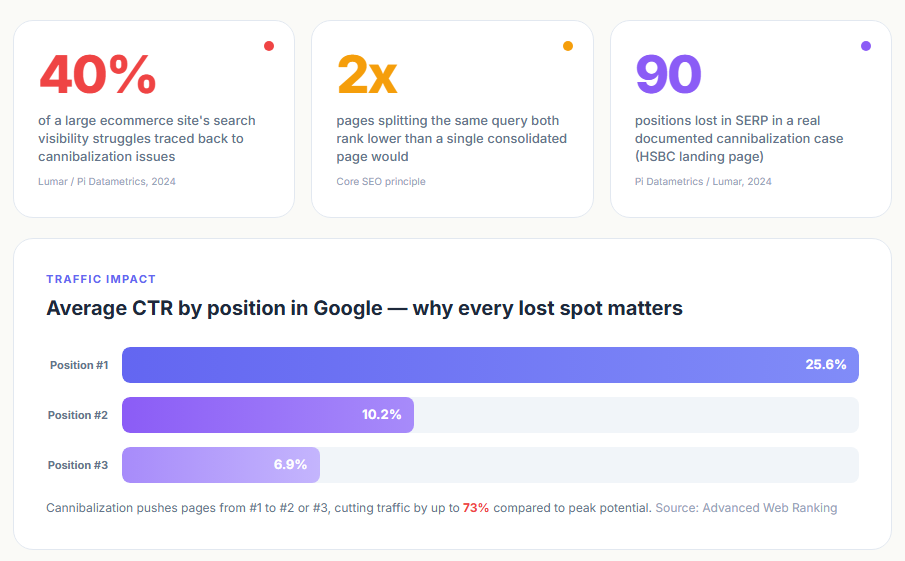
Keyword cannibalization in ecommerce occurs when 2 or more pages on the same site compete for the same search query, splitting ranking signals and reducing the performance of all competing pages.
It is more common than most stores realize. Sites with large product catalogs, ongoing content production, and faceted navigation generate cannibalization problems constantly if keyword mapping is not maintained.
Why Cannibalization Happens on Ecommerce Sites
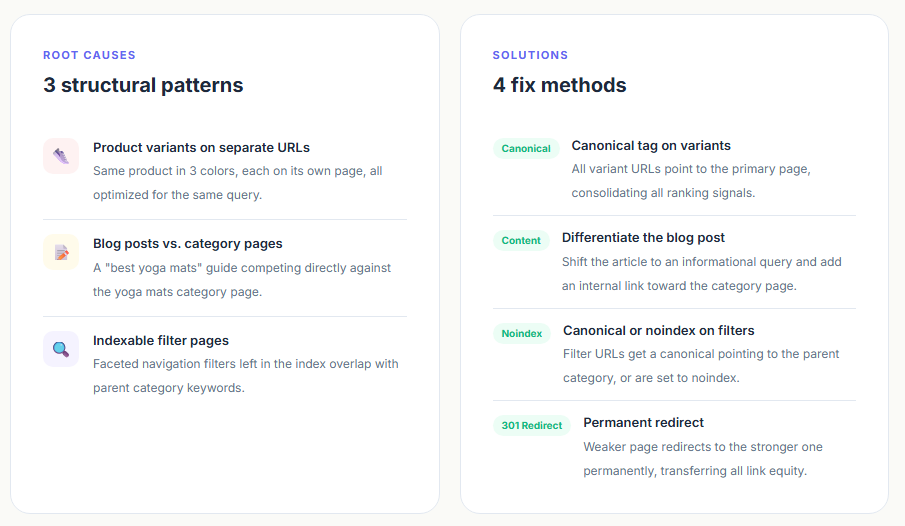
3 structural patterns create most ecommerce cannibalization:
- Product variants on separate URLs all targeting the same keyword (e.g., the same shoe in 3 colors, each on its own page, all optimized for the same query)
- Blog posts ranking for product keywords (e.g., a “best yoga mats” guide competing directly with the yoga mats category page)
- Filter pages left indexable when they overlap with parent category page keywords
How to Detect Cannibalization
Open Google Search Console. Go to the Performance report. Search for a target keyword in the query filter. If more than one URL appears in the Pages tab for the same query, cannibalization is confirmed.
Ahrefs Site Explorer’s “Organic Keywords” report filtered by URL shows which pages rank for overlapping keyword clusters. This works at scale across the full domain, not just query by query.
A targeted site: search in Google (site:yourdomain.com “target keyword”) also surfaces competing pages quickly without any tool access required.
Fix Options by Cause
Product variants: Set a canonical tag on all variant URLs pointing to the primary product page. The primary page consolidates all ranking signals.
Blog posts competing with category pages: Differentiate the blog content to target a related but non-overlapping informational query. Update internal links from the blog post to point toward the category page.
Filter pages cannibalizing category pages: Apply a canonical tag from the filter URL to the parent category, or set the filter URL to noindex. This is standard practice in ecommerce technical SEO.
Consolidation via 301 redirect: When two pages cover the same intent and one has significantly stronger performance, redirect the weaker URL to the stronger one permanently. This transfers link equity and eliminates the ranking conflict.
What Cannibalization Costs
Cannibalized pages see lower click-through rates, reduced page authority, and weaker link signal concentration (ecommerce-today.com, 2024). More directly: 2 pages splitting impressions for the same query will both rank lower than a single consolidated page would.
Fixing cannibalization on a large catalog site is not a one-time task. Keyword mapping maintenance, regular Search Console audits, and a clear page-to-keyword assignment document are what keep it from recurring.
How Do You Prioritize Ecommerce Keywords?
Ecommerce keyword prioritization is not guesswork. It is a scoring process that combines 4 variables: search volume, conversion probability, current ranking position, and product margin.
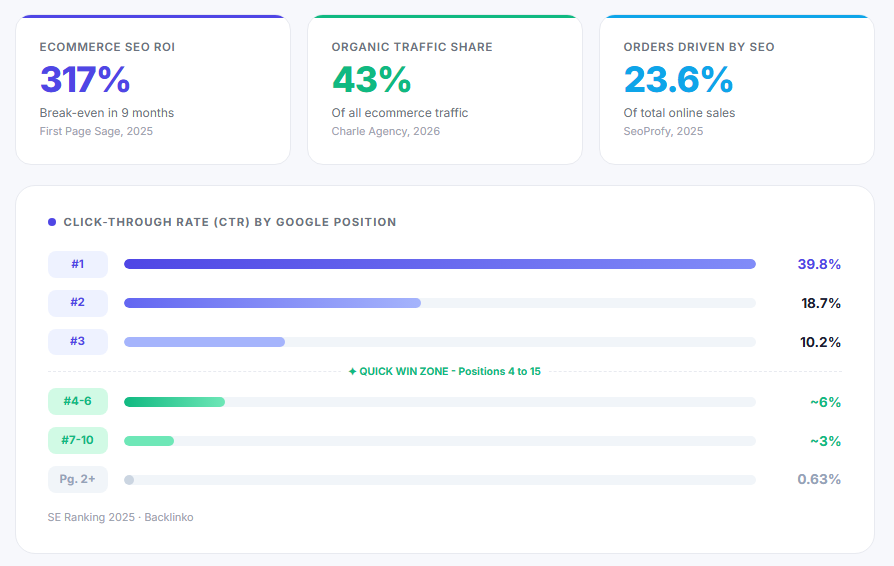
Ecommerce SEO delivers a 317% ROI with a nine-month break-even window (First Page Sage, 2025). That return does not arrive evenly. It concentrates in keywords where intent is high, competition is manageable, and ranking improvement requires the least new investment.
Quick Wins: Positions 4 to 15
The highest-ROI keyword targets are already ranking. Pages sitting in positions 4 to 15 with high purchase intent have established some authority. A focused content and on-page optimization effort can push them into the top 3.
The #1 organic result earns a 39.8% click-through rate. Position #2 earns 18.7%, position #3 earns 10.2% (SE Ranking, 2025). Moving from position 6 to position 2 can triple traffic from the same keyword without finding a single new one.
Pull these from Google Search Console. Filter the Performance report by impressions above 500, average position between 4 and 15, and clicks below what the position should deliver. Those gaps are the fast opportunities.
Long-Term Targets: Category Head Terms
High-volume category head terms need domain authority before they move. Targeting them without a link acquisition plan is a low-probability bet.
70% of marketers say SEO generates more sales than PPC, making it the best long-term growth channel (First Page Sage, 2025). But the timeline matters. Category head terms typically take 12 to 24 months to rank competitively from a standing start.
Assign these to a backlink building roadmap. Pair them with ecommerce link building activity targeting the category page directly.
Keywords to Deprioritize
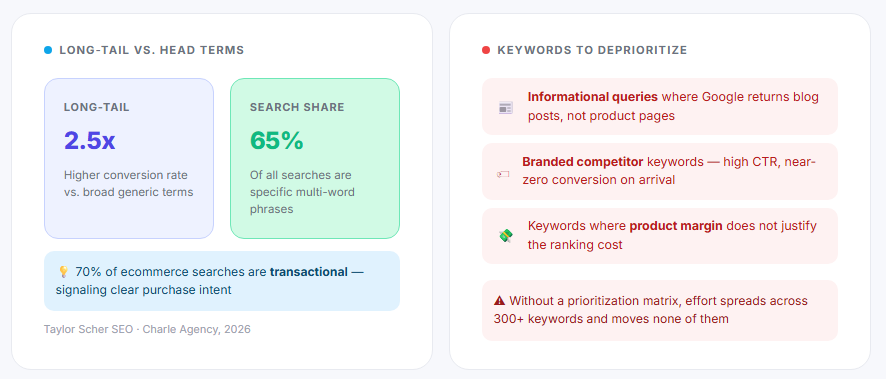
Not every high-volume keyword deserves time. Some actively waste it.
- Informational queries where Google returns blog content, not product pages
- Branded competitor keywords (high click-through rate, near-zero conversion on arrival)
- Keywords where the product margin does not justify ranking cost
The prioritization matrix keeps the team focused. Without it, effort disperses across 300 keywords and moves none of them.
| Priority tier | Criteria | Action |
|---|---|---|
| Quick win | Positions 4–15, high intent, existing impressions | Optimize title H1 Internal links |
| Growth target | High volume, moderate difficulty, clear product match | Build links Improve content depth |
| Long-term | High competition category head term | Link acquisition roadmap 12–24 month horizon |
| Deprioritize | Informational intent, low-margin product, branded competitor | Remove from active roadmap |
What Role Do Product Attributes Play in Ecommerce Keyword Research?
Product attributes are the single largest source of untapped keyword inventory for most ecommerce sites. Every attribute combination (size, color, material, use case, compatibility) is a potential search query with real purchase intent.
Long-tail keywords account for over 91% of all web searches and convert at 2.5x the rate of head terms (Neil Patel). The majority of that long-tail inventory in ecommerce comes directly from product attribute combinations.
Extracting Attribute Keywords from the Product Catalog
Start with the product feed in Google Merchant Center. Every attribute field in the feed represents a dimension users search by. Pull the full list: brand, size range, material, color family, compatible device, activity type, gender.
Cross-reference these attributes against keyword research tool data in Ahrefs or Semrush. Filter by transactional intent. Any combination generating 50 or more monthly searches is a keyword target worth mapping to a page.
A footwear retailer with 5 attributes (gender, material, activity, width fit, size range) can generate thousands of keyword targets from a single product category. Most of them have low competition because competitors are targeting head terms instead.
When to Create Pages vs. When to Stay in Copy
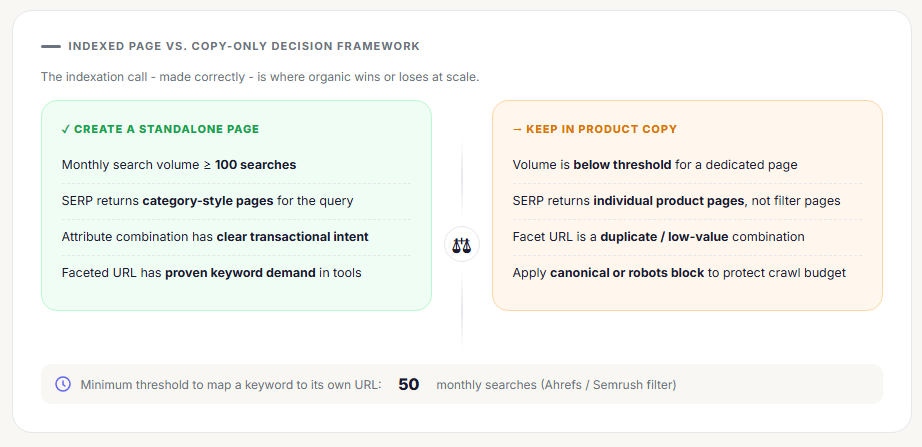
Not every attribute keyword justifies its own URL.
Create a standalone indexed page when: the attribute combination generates 100+ monthly searches AND the SERP returns category-style pages for that query.
Keep it in product copy when: volume is below the threshold or the SERP returns individual product pages, not filter pages.
Properly implemented faceted navigation covering validated attribute keyword demand can increase long-tail organic visibility by 20 to 35% (AuthoritySpecialist, 2025). Getting the indexation decision wrong in either direction wastes that opportunity entirely.
Attribute Keywords and Faceted Navigation
On unmanaged ecommerce sites, 40 to 60% of crawl budget goes to facet URL combinations that should never be indexed (DigitalApplied, 2026). That budget comes directly out of what Google allocates to crawling actual product and category pages.
The fix: index attribute facet pages with proven keyword demand. Block or canonicalize everything else. The ecommerce SEO strategy connecting keyword research to facet management is what separates stores that scale organic traffic from those that stay flat.
How Do Seasonal and Trend-Based Keywords Affect Ecommerce Strategy?
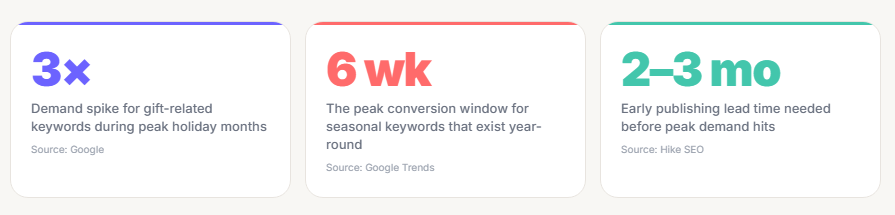
Search volume is not static. For most ecommerce categories, it shifts predictably by month and dramatically by season. Treating keyword demand as a flat number misses the timing decisions that determine whether you rank during peak or miss it entirely.
Predictable Seasonal Patterns
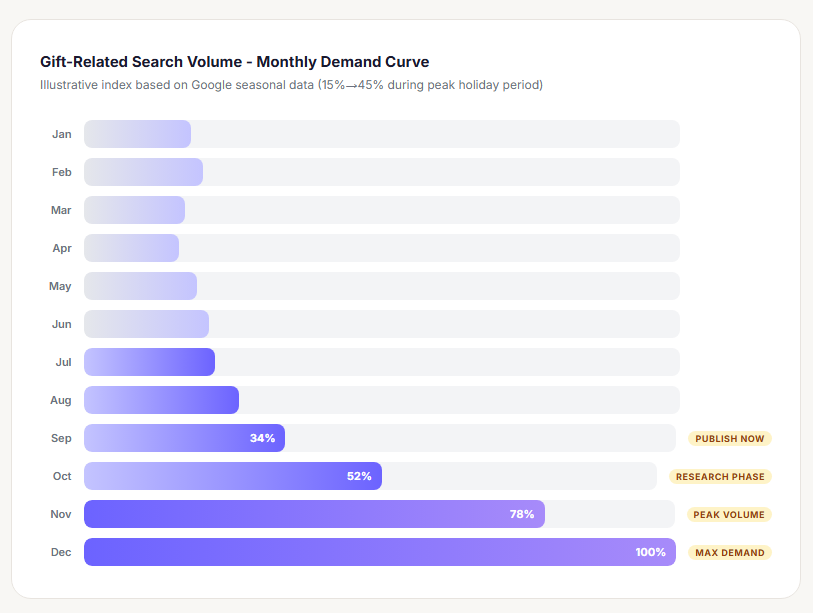
The search volume for gift-related queries increases from 15% to 45% during peak holiday months (Google). That is a 3x demand spike for a keyword cluster that exists year-round but only converts at scale during a 6-week window.
Seasonal SEO requires content and pages to be indexed well before demand peaks. Publishing seasonal category content 2 to 3 months ahead of the peak gives Google sufficient time to crawl, index, and rank the page (Hike SEO). Pages launched in November for November demand almost never rank in time.
Retailers who optimize Christmas-related category pages in September and October consistently capture the research phase traffic that starts in those months, before December competition reaches its peak.
Trend-Based Keywords: Different Rules Apply
Predictable seasonal keywords follow historical data. Trend-based keywords do not.
A viral product moment on TikTok can generate 50,000 monthly searches for a query that did not exist the previous month. These cannot be planned the same way seasonal keywords can.
Monitoring tools for trend detection:
- Google Trends – real-time search interest by query and region
- Exploding Topics – surfaces rising queries before they peak
- TikTok search data – shows purchase-intent queries emerging in short-form video communities
The response time is the key variable. A store that identifies a trending product query and publishes a targeted category or product page within days has a real ranking window. Most stores take weeks, by which point the trend has either peaked or larger competitors have moved in.
Evergreen vs. Seasonal Keyword Balance
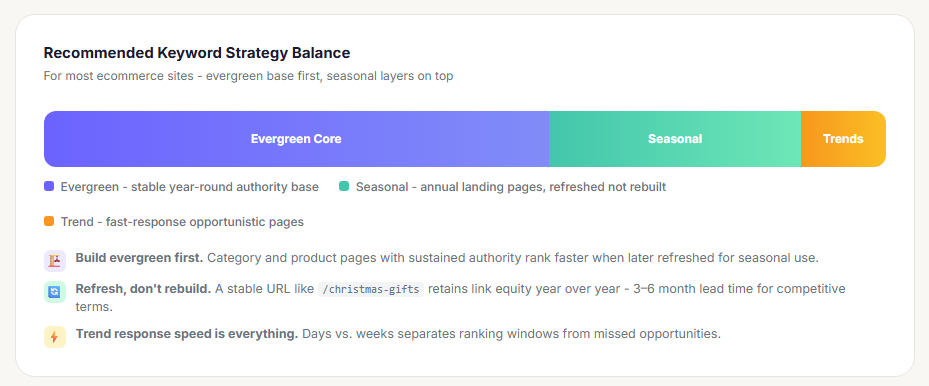
A keyword strategy weighted entirely toward seasonal queries creates revenue volatility. A strategy weighted entirely toward evergreen queries misses compounding traffic peaks.
The practical balance for most ecommerce sites: build the evergreen category and product keyword base first. Add seasonal keyword layers on top as dedicated landing pages that are updated annually rather than rebuilt from scratch. Pages that already hold authority rank faster when refreshed for a new season than new pages published cold.
How Do You Track Ecommerce Keyword Performance?
Keyword ranking is a leading indicator. Organic revenue is the metric that justifies the work. Both need tracking, at different intervals and through different tools.
Ecommerce SEO delivers its ROI over 9 to 36 months (First Page Sage, 2025). That time horizon requires a measurement system that catches problems early, before they compound into revenue loss.
The 3-Layer Tracking Framework
Layer 1 – Ranking position: Track target keywords weekly in Ahrefs or Semrush. Watch for position drops of 5 or more spots, which often precede traffic drops by 2 to 4 weeks.
Layer 2 – Organic traffic: Monitor landing page organic sessions in GA4 under Reports > Acquisition > Traffic Acquisition, filtered by organic search. Set up year-over-year comparisons to separate seasonal fluctuation from actual performance change.
Layer 3 – Organic revenue: Use GA4 ecommerce reports filtered by organic source to connect keyword-driven traffic to purchase revenue. GA4’s cross-channel data-driven attribution model distributes conversion credit across the full session path, not just last click.
Why Ranking Alone Is Incomplete
A page ranking #3 behind 4 Google Shopping ad units and a featured snippet may generate fewer clicks than a page ranking #7 on a query without those SERP features.
Organic CTR dropped 61% for queries where AI Overviews appear, from 1.76% to 0.61% (Seer Interactive, 2025). Tracking ranking position without tracking actual clicks from Google Search Console gives an incomplete picture of performance.
Cross-reference ranking data with Search Console impressions and CTR for each target keyword. A keyword holding position #2 with below-average CTR signals a SERP feature problem, not a ranking problem. The fix is different in each case.
Review Cadence by Keyword Tier
| Keyword tier | Review frequency | Primary tool |
|---|---|---|
| High-priority commercial terms | Weekly | Ahrefs Semrush rank tracker |
| Category head terms | Bi-weekly | Google Search Console |
| Long-tail product attribute keywords | Monthly | GSC Performance GA4 landing page report |
| Seasonal keywords | Pre-peak audit Post-peak review | Google Trends GSC |
Tracking without action is reporting. The review cadence only produces value when position drops trigger an audit of the page, and revenue drops trigger a full keyword-to-page mapping review.
A complete review of ecommerce SEO benchmarks by category gives context for whether a site’s organic performance gap is a keyword strategy issue, a content issue, or a technical one. Without that context, the fix is a guess.
FAQ on Ecommerce Keyword Research
What is ecommerce keyword research?
Ecommerce keyword research is the process of finding search queries that signal purchase intent and mapping them to specific pages in an online store. It targets transactional and commercial investigation queries, not general informational ones.
How is ecommerce keyword research different from regular keyword research?
Regular keyword research targets any query. Ecommerce keyword research focuses on buyer intent signals – queries where users are comparing, evaluating, or ready to purchase. The page types targeted are product pages and category pages, not blog posts.
What tools are used for ecommerce keyword research?
The most used tools are Ahrefs, Semrush, Google Search Console, and Google Keyword Planner. Google Merchant Center’s search terms report and Amazon autocomplete are underused but highly effective for purchase-intent discovery.
How do I find keywords for product pages?
Start with product attributes: material, size, color, compatibility, and use case. Each combination is a potential search query. Cross-reference against Ahrefs or Semrush filtered by transactional intent, then assign one primary keyword per product page.
What is keyword cannibalization in ecommerce?
Keyword cannibalization happens when two or more pages on the same site compete for the same search query. It splits ranking signals and lowers performance across all competing pages. Google Search Console and Ahrefs both detect it reliably.
How do I choose between targeting a category page or a product page for a keyword?
Check the SERP. If Google returns category listings and product grids, the keyword belongs on a category page. If it returns individual product pages, target a product page. Search intent in the SERP layout decides, not keyword length.
Do long-tail keywords work for ecommerce?
Yes. Long-tail keywords convert at 2.5x the rate of broader head terms and account for over 91% of all searches (Neil Patel). Product attribute queries like “waterproof hiking boots wide fit” are long-tail and carry strong purchase intent.
How often should I do ecommerce keyword research?
Review high-priority commercial keywords weekly using a rank tracker. Run a full keyword gap analysis quarterly. Add seasonal keyword audits 2 to 3 months before each peak period to allow enough indexing time before demand spikes.
How do seasonal keywords affect my ecommerce keyword strategy?
Seasonal keywords follow predictable demand cycles. Gift-related search queries increase 15% to 45% during peak holiday months (Google). Pages need to be live and indexed 2 to 3 months before the seasonal peak to rank in time.
How do I measure whether my keyword targeting is working?
Track 3 layers: ranking position in Ahrefs or Semrush, organic traffic per landing page in GA4, and organic revenue using GA4 ecommerce reports filtered by organic source. Rankings alone miss click-through rate drops caused by SERP features.
Conclusion
This conclusion is for an article presenting ecommerce keyword research as a structured, repeatable process, not a one-time task.
Done correctly, it connects your product catalog to real purchase intent at the query level. Every keyword maps to a page. Every page targets a specific search demand.
The stores winning in organic search are not targeting more keywords. They are targeting the right ones, with the right page types, at the right time.
Keyword mapping, cannibalization audits, product attribute research, and seasonal planning all compound over time. So does the revenue they drive.
Use Google Search Console, Ahrefs, and GA4 together. Track organic revenue, not just rankings. That is the measurement that actually reflects whether your keyword strategy is working.
